
Shopper Account Status can be seen and updated on the Shopper Log page and Shopper Profile pages.
Shopper side
The shopper can update their account from Active to Deactive, and vice versa.
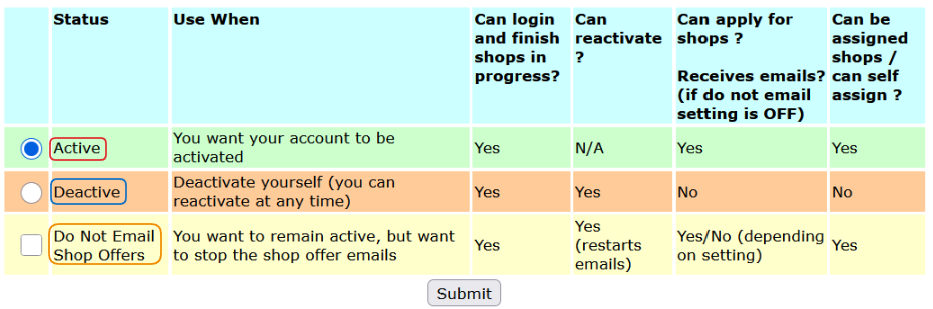
If they deactivate themselves, they can update the status back to Active at any point later on.
Additionally, by checking the Do Not Email Shop Offers checkbox, they can remain active but not receive any e-mails related to shop offers.
Admin side
An admin can set the shopper account to Active or Deactivated. The latter has a few additional suboptions, and the details of each subtype can be checked directly in the system.
You can also use the Do Not Email Shop Offers checkbox to prevent shop offer emails. Please keep in mind that if a shopper checked this box, an admin unchecking it will not change the setting. The shopper will not be removed from the DNE list.

Only the shopper can (re)activate this setting.
During Account Status update, you will need to add a citation related to the change you are performing.
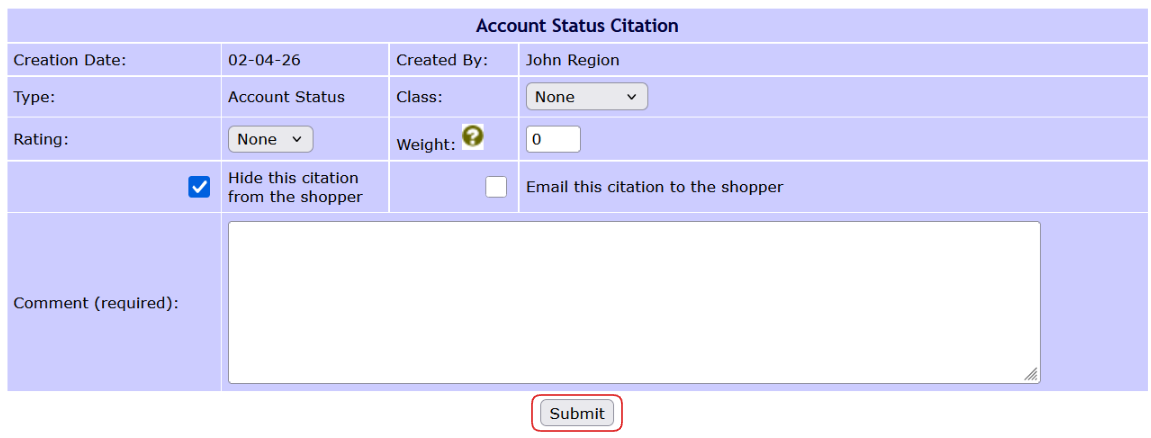
You can email the citation to the shopper or hide it, and once Submitted, the citation will always be visible in the Shopper Citations section.